Key Takeaways
- Instagram Broadcast Channels are useful for businesses to reach out directly to followers via Instagram DMs.
- Broadcast channels can be utilized to launch a product, offer exclusive deals, update the community about your events, conduct polls, help the community, etc.
- For a channel to be really effective, it needs to have a definite promise, for example, followers will receive something, and how often.
- For a business broadcasting channel, it is best to do 2-4 times per week.
- It is best to broadcast channels that have value, participation and conversion in the content.
- Instagram Broadcast Channels are also unique in that channels show up in the DM.
Intro
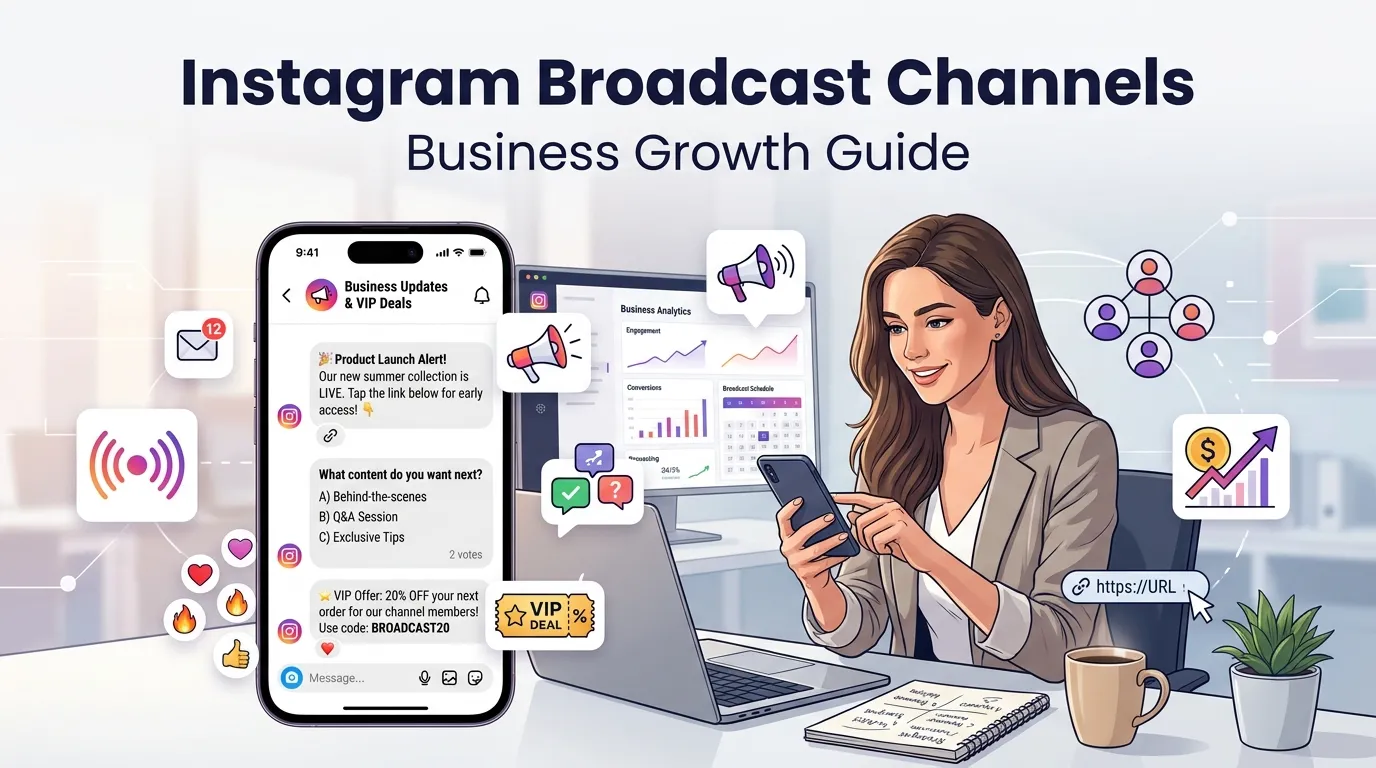
Instagram Broadcast Channels enables companies to reach followers in Instagram directly with their updates. Implementing a broadcast channel for a business includes making essential declarations, introducing brand new products, showing behind-the-scenes video, gathering inputs from the audience, and also communicating directly with those who wish to interact.
How To Use Instagram Broadcast Channels is going to get you launched. A channel should communicate to people what and how often they’ll be receiving, and why they’re worthwhile to maintain notifications on. The channel mix of value, participation and conversion works best for broadcast channels in 2026.
According to Meta, broadcast channels are a public one-to-many messaging medium for creators to use to invite followers and share updates. Instagram is now richer with features like replies and prompts and with insights that allows broadcast channels to be more valuable to business engagement and product and audience insights.
What Are Instagram Broadcast Channels?
Instagram Broadcast Channels are a Truly Instagram Public messaging system. By utilizing Instagram DM, Channel owners can inform the members of any updates to the Channel while members may hear the messages in their inbox.
A broadcast channel is NOT a Group chat. A group chat is developed for joint discussions. A broadcast channel was designed for updates from the channel owner with controlled engagement that include reactions, polls, prompts and/or replies.
Key Features of Instagram Broadcast Channels
Some of the top functions of Instagram Broadcast Channels are:
- Text updates
- Photos and videos
- Voice notes
- Polls
- Prompts
- Replies
- Channel notifications
- Public channel discovery
- Invite links
- Promoting Instagram bio links.
- Insights & Best Practices
According to Instagram, replying makes it nestled into the channel messages and creators can delete or report replies. Followers can reply with text or photos for up to a day using prompts; and their insights provide details of interactions, story shares, and poll votes made by followers.
Why Broadcast Channels Work for Business
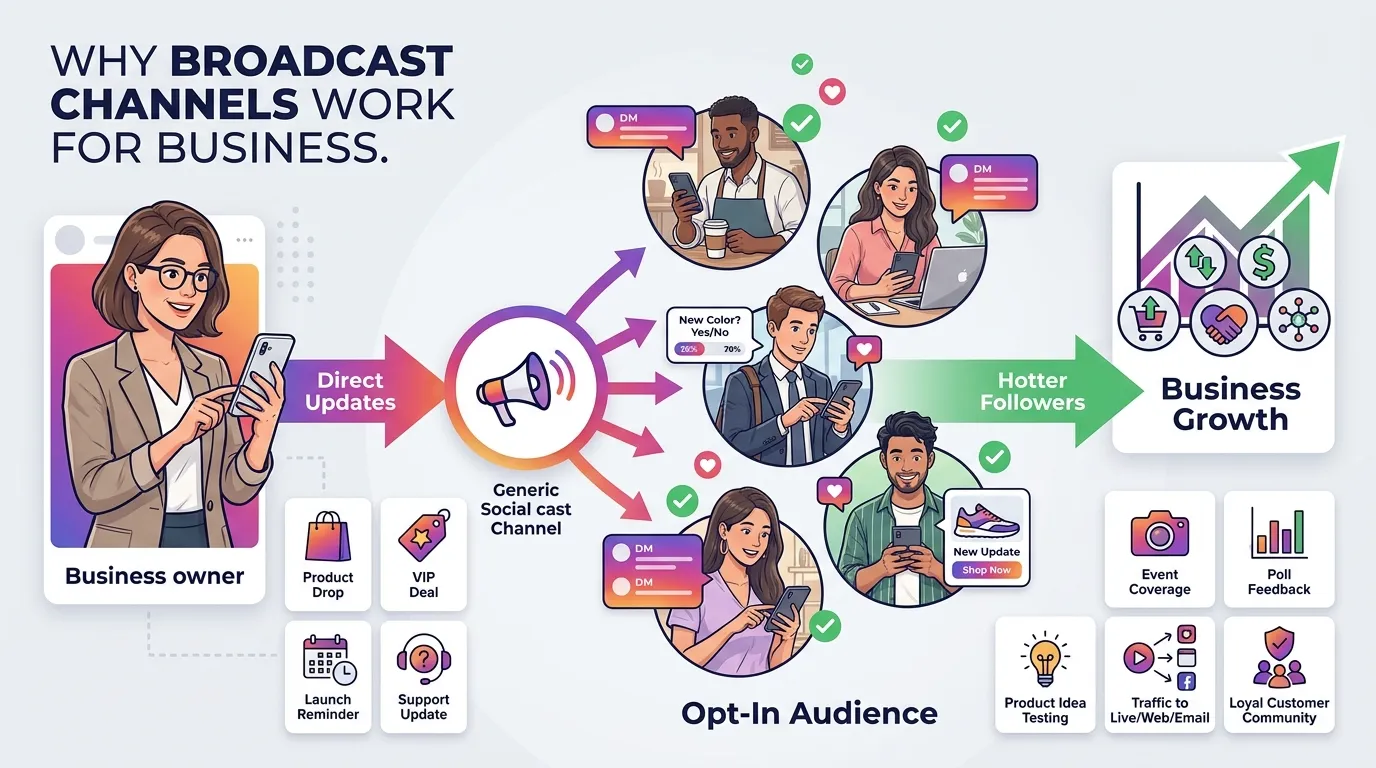
Broadcast channels work well for business as the followers have to opt in to the channels. Such an opt-in yields a hotter audience than typical feed reach.
Instagram broadcast channels can be used in a business to:
- Announce product drops
- Provide promotions for VIP deals.
- Send launch reminders
- Maintain a support on updates on the post.
- Share event coverage
- Collect poll feedback
- Test product ideas
- Capture traffic to Instagram Live, YouTube, Facebook, LinkedIn or your email list.
- Use personal messages to foster loyal customers, regularly.
Instagram Broadcast Channels vs. Stories: Which Should You Use?
Publish direct updates on Instagram Broadcast Channels that followers will get via DM. Increase your Instagram Stories’ visibility and discoverability.
Instagram Stories are more effective to get mass exposure. Warm followers that want updates can be alerted via broadcast channels.
| Reels & Instagram Stories | Going live and broadcasting on Instagram Reels or Stories. |
|---|---|
| With_main_use!=direct Follower_Updates | With_circumstance!=public daily Content |
| DNAU Media Library – | Instagram DMs – Story tray – |
| Audience – Users who join in | Followers & viewers |
| Likely to be seen by | Executive leaders, coaches, and elementary team members |
| Executive leaders, coaches, and everyone else in the building | If your channel messages are showing in people’s DMs, that means it’s stronger (more noticeable), but if the story is being shown, it is lower (less noticeable) as many accounts are viewing the stories. |
| Awareness, reach prompts business role, retention and conversion follows: |
Who Can Create a Broadcast Channel on Instagram?
As of now, Instagram’s Help Center indicates that it’s available to a public account with over 1,000 followers, though the launch is still underway, and the feature may not be available for every account.
Eligibility Requirements for Instagram Broadcast Channels
There may be factors that influence eligibility, including:
- Public account status
- Account type
- Follower count
- Region
- App version
- Policy standing
- Feature rollout access
Tips for a business to consider when using Instagram would include ensuring the Instagram account is set to public, abiding by Instagram policies, keeping the Instagram app updated and checking the Instagram DM creation menu.
How to Check if You Can Create a Broadcast Channel
To see if it is possible to make a channel of broadcasting:
- Open Instagram.
- Navigate to Instagram DM’s.
- Click on the compose icon.
- Search for the words, Create broadcast channel” or “Create channel.”
- If this option isn’t displayed, update the app.
- Review the description and visibility of accounts.
- If it doesn’t appear, wait for an update until rollout availability.
How to Create an Instagram Broadcast Channel
If you want to have access to broadcast channels, open the Instagram Direct and begin a new channel using the message creator.
Step 1: Open Instagram DMs
Open Instagram and click on the message icon. Live over Instagram starts within the DMs.
Step 2: Start Creating a New Channel
Click on the new message/compose icon. If there is a Select “Create broadcast channel” option, select it.
Step 3: Name and Customize Your Channel
Select a channel name that is not ambiguous. It is best to name something to reflect its value.
Good names include:
- Brand VIP Updates
- Weekly Top 3 Deals
- Product Drop Alerts
- Inner Circle Notes
- Behind the scenes: Behind the scenes of the studio.
- Launch Room
Include a brief description of what the Channel Promise Framework is.
Example:
Become a member to receive weekly product drops, early sale alerts and behind-the-scenes updates and quick polls.
Step 4: Finalize and Launch
Check the channel parameters, publish the channel and send the first message. Never start out your message with ‘Hey guys. The first message should be an explanation of what it is your members will receive.
Welcome message template:
“Welcome to our broadcast channel: You will receive here 2–3 times per week early product updates as well as some weekly notes from behind the scenes and quick polls that help us to decide on what products to create next.”
How Instagram Broadcast Channels Work
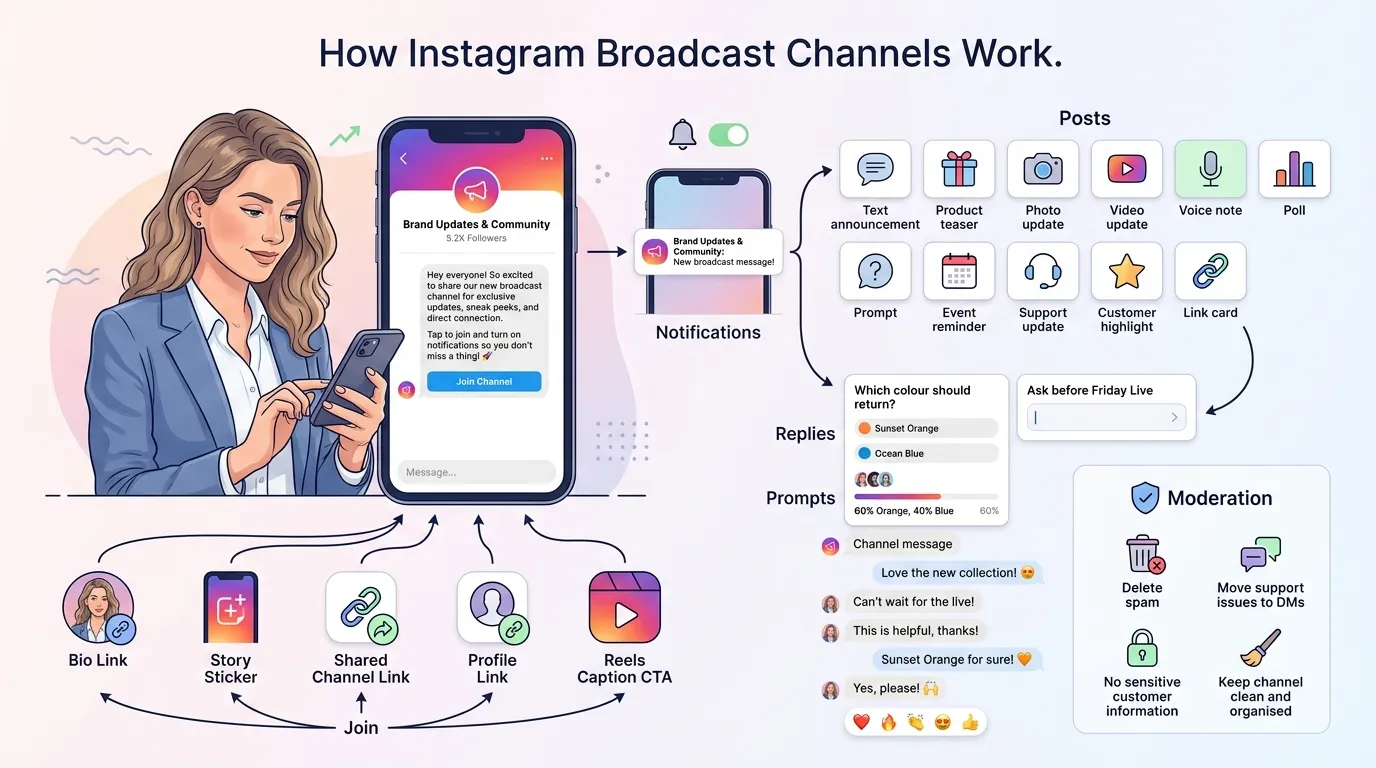
Broadcast channels are based on the idea of posting channel messages to Instagram members’ inboxes. However, members can join based on an invite, a profile link, any story sticker or through a shared channel link.
Joining + Notifications (Critical for Growth)
The first step is to join. Notifications determine whether or not followers will continue to follow along.
To grow a channel:
- Include the channel link in your Instagram bio link.
- Invite by sharing it on Instagram Stories.
- Use names of the channel in Reels captions.
- Pin a launch post.
- Invite Followers after teaser of product.
- Prompt members to set notifications to on.
The ideal collaborations for channel growth occur when a creator, brand partner, or Micro-Influencers vs. Macro-Influencers vs. Celebrities campaign leads followers to a single call-to-action for them to join.
What You Can Post
You can post:
- Text announcements
- Product teasers
- Photos
- Videos
- Voice notes
- Polls
- Prompts
- Links
- Event reminders
- Support updates
- Customer highlights
The essential channel components to broadcast are value, participation and conversion.
Replies + Prompts Changed the Game
It was possible to make broadcast channels more interactive with the help of replies and prompts. Replies are replies made below channel messages, for followers to respond. Prompts can enable channel owners to pose inquiries for a restricted duration and respondent customers can answer them either with a written message or picture. According to Meta, prompts can guide creators to the prevailing trends and successes.
Good prompt examples:
- Or, what colour of the product should be brought back?
- “What do we need to put in the running order?”
- “Ask before Friday Live.”
- “Decide on what the next tutorial topic will be.”
- “Submit a picture on how do you use this product.”
Moderation + Safety (Don’t Skip This)
Moderation is important in order to eliminate clutter and to fix issues.
Set rules early:
- Minimize responses if not necessary.
- Delete spam replies.
- Report abusive replies.
- Handle Support issues in DMs.
- Response to recurring questions should be based on reply templates.
- Don’t put sensitive customer information within the channel.
Clear and moderate channel discussions every day to prevent discussion getting too ‘noisy’.
The “Channel Promise” Framework (Why People Join and Why They Stay)
The Channel Promise Framework is a simple message that lets followers know what you will be giving them in the channel.
Use this formula:
“This media provides [value] [frequency] to [audience] so that they can [benefit].”
Examples:
- “This channel helps skincare customers by providing them with product drop-alerts in order to buy before the stock runs out twice per week.”
- “This channel provides fitness enthusiasts with a weekly reminder for their workouts and live Q&A sessions to remain consistent.
- “This channel provides local customers with alerts for the upsurge of stores and offers pop up deals as well as VIP deals.”
Channel promise positively affects welcome message for channel and decreases channel exit.
What to Post in Instagram Broadcast Channels
Create content that will provide value, elicit participation, or drive conversion. For a business broadcasting channel, it is best to do 2-4 times per week. Do not post more than once a day unless it’s a launch or event, or a serious campaign.
1) Value (Gives People a Reason to Keep Notifications On)
Value posts are where people learn or save money, have access, or that they feel closer to the brand.
Examples:
- Weekly Top 3 Digest
- Channel Exclusives behind the scenes
- Early product previews
- Voice note best practices:
- Tips and checklists
- Resource links
- Analysis of the Social Marketing Landscape: AI Social Marketing Trends
- Creators’ picks for HookSounds audio
- HubSpot CRM tip of the week – Page 253.
- One of Loomly/Sendible’s best content planning guidelines is to create more future content now!
2) Participation (Turns Lurkers Into Signal)
When someone you’ve reached out to becomes a participation poster, they can be a valuable source of feedback.
Examples:
- Polarize by having conversations on channels about engagement
- Prompt questions
- Product votes
- Q&A prompts
- Content topic voting
- User-generated content requests
- Subscribers will be recognized for their participation in the program with themed club drives.
Participation provides product and audience feedback, without conducting a lengthy survey.
3) Conversion (Turns Engagement Into Money)
Conversion posts drive converts to action.
Examples:
- Product Drop Countdown
- VIP deal reminder
- Instagram Subscriptions offer
- New link to book service online
- Limited stock alert
- Instagram Livestreams reminder
- Outbound conversions of visitors to YouTube, Facebook, LinkedIn or email list
For conversion, it’s always best “to show the value first, and then ask for the sell second.
12 Business Use Cases for Broadcast Channels
The number of broadcast channels is needed to match the audience, offer and content capacity, for business use.
1) The Channel Launch (Your First Message Is Everything)
When launching the channel, it is important to address what members see in it, how frequently they use it and what they will find beneficial.
First message template:
You’re in! This channel is for announcements before product launches, behind the scenes updates and quick polls, we will be posting 3 times per week and will post links to product launches here first!
2) Product Drop Countdown (7-Day Sequence)
Go through a 7-day sequence to release new product.
Example:
- Day 7: Teaser image
- HERE’S TO THE GOOD PEOPLE OF THE COUNTRY AND PELOPONNOR FREIGHT [Voice note behind scene]
- Day 5: Poll on product use
- Day 4: Feature reveal
- Day 3 – Price/bundle hint
- Day 2: Will serve as a reminder and a list of FAQ’s
- Day 1: Launch link
3) Live Event / Store Launch / Popup Coverage
Communicate live event changes on a broadcast channel.
Post:
- Opening time
- Location pin
- Queue updates
- Stock updates
- Live photos
- Last-call reminders
- Thank you post event message
4) “VIP Deal” Without Killing Your Brand
VIP sells need to come with a sense of scarcity and attainment.
Examples of Suitable VIP deals:
- Early access
- Bundle code
- Subscriber-only bonus
- Free sample when you buy it –
- First 100 buyers reward
Refrain from using the channel as one of “an outlet to sell.”
5) Creator + Brand Collab (When Your Brand Account Has Limited Access)
The brand can receive traffic from the creator’s channel via a collaboration post, a Story or a Reel.
When it comes to creator and brand collab campaigns:
- Invite one clear channel to creator.
- Tell why to join.
- REDUCE channel promise specific.
- No tracking ofJoin during the Campaign window.
6) “Support Status” Updates (Shipping Delays, Outages, Policy Changes)
Communicate about business matters with Support Status Updates for urgency.
Examples:
- Shipping delay notice
- Stock delay
- Website outage
- Policy change
- Event cancellation
- Delivery region update
Don’t solve individual support problems within the channel. Transfer an individual case to DMs.
7) Weekly “Top 3” Digest (The Easiest Sustainable Format)
It is easy to keep updated with a Weekly Top 3 Digest.
Example:
“Top 3 this week:
The first possible delivery of new products is on Friday.
Live Q&A is at 7 PM on Sunday.
Polling for next month’s colour is now on!
8) “Inner Circle” Content (Behind-the-Scenes Voice Notes)
Inner Circle Content is effective, as voice notes are personal.
Post:
- Founder notes
- Team updates
- Studio progress
- Lessons learned
- Production updates
- Real-time event thoughts
9) Community Highlights (UGC, Wins, Shoutouts)
Community features inspire a loyal brand.
Post:
- Customer photos
- Reviews
- Before-and-after results
- Creator wins
- Member shoutouts
- Poll result winners
Never copy or post customer’s content without permission.
10) Broadcast or React to Breaking News
On the channel comment on industry breaking news.
Examples:
- It is important to note that social media platforms contain updates.
- AI Social Marketing Trends
- Product policy changes
- Industry regulation changes
- Platform outages
Continue to have brief and helpful breaking news.
11) Answer Common Questions
Utilize channel to solve redundancy questions.
Examples:
- “What’s the next time of the replenishment?”
- “How do I join?”
- “Where is the mart?”
- So, “What size should I buy?”
- “To what amount time will convey take?”
- Is it a thing I can do external Instagram?
12) Drive Traffic to External Channels
Network TV channels to attract visitors to:
- Instagram bio link
- YouTube
- Website
- Email newsletter
- Product page
- Event registration
- Instagram Subscriptions
- Instagram Livestreams
The link needs to be the same as the channel message.
How to Measure Broadcast Channel ROI
Broadcast Channel ROI indicates if the channel results in helpful company outcomes. ROI should encompass engagement, traffic, conversion and retention.
Use This Three-Layer Measurement Stack
Working with this Three-Layer Measurement Stack:
- Channel activities: Joins, Exits, Reactions, Prompt Replies, Polls, Poll Votes.
- Traffic Activity: Link Clicks, Bio Link Clicks, Landing Page Visits, Story Shares.
- Sales / customer support reduction / customer bookings and/or leads / repeat purchases.
Meta lists some of the metrics that can be included in channel insights as total interactions, story shares, and polling votes, among others. These metrics provide insights into what content is resonating with the channel owners.
The Simplest Attribution Hacks That Don’t Lie
Use simple Attribution Hacks:
- Use a single and unique link per channel.
- Only apply one promo to the channel.
- Have a focussed landing page just for channel members.
- For traffic: Count separately traffic day of launch.
- Inquire at checkout about the source of the information, by asking the question, “Where did you hear about this?”.
- Send all your campaigns with a UTM link.
- Try to match channel message time with Web traffic spikes.
Attribution needs to be simple to do and be repeated each week.
The Big Limitation: You Can’t Really Automate Posting to Channels
Not yet, Instagram doesn’t have a “standard” workflow for the business channels to allow as much scheduling and automation for the broadcast channels as there is for feed posts in the Instagram scheduler.
Instagram posting tools like HubSpot, Loomly, Sendible and other Instagram scheduler tools can be of help in the general content planning process, but the posting process in broadcast channels still require a mostly manual process.
That is important, since companies require a channel content calendar for niches and a person who has to post the content.
The Business Power Move: Use the Channel to Start Conversations, Then Automate the Conversation
The strategy behind the power business move is straightforward, use the channel to generate interest and bring interested users in to open DMs where automation can be used to help.
The channel is not to be made spam. The action should be ushered in by the channel.
Example:
“Need the size guide? Respond back to our last Story or direct us SIZE.”
It puts the follower in a one-to-one DM configuration.
How Spur Plugs Into This (Without Making It Spammy)
Spur can act as a support for the DM part of the workflow. The trigger is created by the broadcast channel. Follow-up conversations can be managed when followers move to DMs with Spur’s assistance of replies and keywords.
Use Spur for:
- FAQ replies
- Product recommendations
- Lead capture
- Booking links
- Support routing
- Coupon delivery
- Follow-up messages
Avoid the use of automation to make it seem as though each message is personal. Save the automation – be clear and helpful!
The Simplest “Channel → DM Automation” Playbook
Please use this Channel: → DM Automation Playbook:
- Post a channel message with just one clear action to take.
- Have members key-in DM keyword.
- Reply with the correct link/answer using Spur.
- Mark the point of engagement (lead/buyer interest).
- Redirect the follower to a product flow, booking flow or support flow.
- Check for results after 24-48 hours.
Example:
Channel message:
There is also a message to users stating “New drop is live Friday. DM ‘DROP’ for the early access link.”
DM automation:
“This is the landing page for early access it will open on Friday at 10 AM.”
A 30-Day Launch Plan You Can Actually Follow
A 30-Day Launch Plan will help the channel stay focused upon launch.
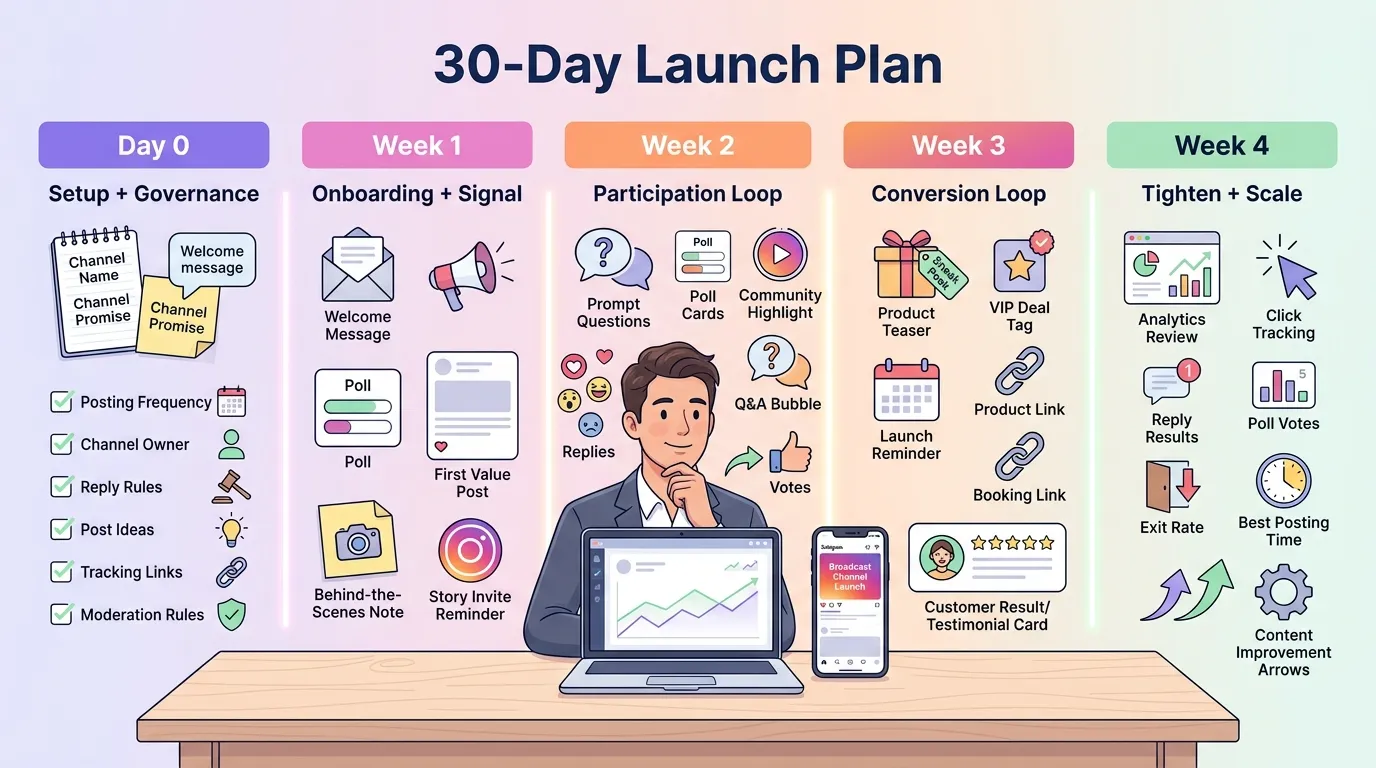
Day 0: Setup + Governance
Pre-load the system with a complete setup + governance.
Checklist:
- Choose channel name.
- Write channel promise.
- Design welcome message template.
- Set posting frequency.
- Assign channel owner.
- Decide reply rules.
- Prepare 10 post ideas.
- Create tracking links.
- Create moderation rules.
Week 1: Onboarding + Signal
To get people collecting signal, Week 1 should be used to get them in the channel.
Post:
- Welcome message
- Poll about interests
- First value post
- Behind-the-scenes note
- Story invite reminder
Objective: Understand the reasons why members joined.
Week 2: Participation Loop
A participating loop should be created for week 2.
Post:
- Prompt question
- Poll
- Community highlight
- Q&A request
- Your answer should address the question in few words.
Objectives: To get members reacting, replying and voting.
Week 3: Conversion Loop (Without Becoming Annoying)
Week 3 should be testing content of the conversion loops.
Post:
- Product teaser
- Reminder
- VIP deal
- To link with product/booking
- Results/experience from the customer
Goal is to sell or capture leads – NOT turn every post into a sales promotion.
Week 4: Tighten + Scale
The 4th week will be to tighten and scale.
Review:
- Which posts were replied to?
- What did posts earn poll votes?
- Which posts were the ones that gained clicks from people?
- Which of the posts does it cause exit from?
- When was that message sent that really worked?
- Which product issues did you reprise?
Then enhance aspects like posting frequency, channel promise, and content pillars.
Common Mistakes (And How to Fix Them Fast)
The majority of the common pitfalls occur when brands go live without having any channel plan.
Mistake: You Launch With “Hey Guys”
Fix:
The very first step will be to have an obvious promise.
Better first message:
This channel will provide you a notifier for the restock dates, links for the launch and a product tip 3 times a week.
Mistake: It Turns Into a Discount Channel
Fix:
Apply 70 valgaverting, 20 aktivävätDatum and 10 konverteraJe. When a channel solely shares reductions codes, its members find out to wait for reductions.
Mistake: You Enable Replies and Get Chaos
Fix:
Replies—Use for specific messages. Enable replies in Q&A, feedback and during the campaign moments. Remember to not allow the “allow replies” option when making announcements.
Mistake: You Handle Support Issues Inside the Channel
Fix:
Provide assistance for DMs.
Example:
“If you need order support, please DM us with your Order number.
Mistake: You Can’t Measure Anything
Fix:
Use 1 link, 1 code and 1 weekly tracking sheet. Make sure to measure the broadcast channel prior to adding more.
A Real-World Example to Steal Ideas From
A skin care brand can launch a channel for broadcast that is “Glow Drop Alerts.”
Channel promise:
“You’ll be notified first of restock, receive updates about skin care routines, behind the scenes lab updates and member product voting.”
30-day content plan:
- Week 2: Intake forms, orientation, and group formation; routine poll; founders’ voice note
- Week 2: Product education, answering questions about ingredients, customer result highlight
- Week #3: The countdown to Product Drop, VIP deal, launch link (product drops begin)
- Week 4: Optionally give a feedback prompt, do a restock check, and send a Weekly Top 3 Digest.
ROI tracking:
- Channel joins
- Poll votes
- DM keyword replies
- Link clicks
- Code Product sales.Sales of Products through Code.
This example is effective, since the channel provides value prior to requesting a sale.
The “Right” Way to Think About Channels in 2026
“Another place to post” shouldn’t be the term for thinking about channels in 2026. A channel of attention is direct attention in Instagram.
Utilize Instagram Broadcast Channels just in case you require it:
- Fast announcements
- Warm audience engagement
- Product launch traffic
- Community feedback
- Brand loyalty
- Direct follower updates
- Controlled conversation
- Insights on a product/service and its users.
It is a mistake to put ALL your Instagram posts in the channel. If there is information that really needs to be communicated, but is not urgent enough to trigger a DM-level alert, then release it through the channel.
Summary
Instagram Broadcast Channels enable businesses to send out direct updates, product launches, gather feedback from their audience, and foster deeper engagement within Instagram DMs. Utilize a broadcast channel for announcements, product drops, VIP offers, live updates of events and parties, community highlights, and week-at-a-glance content.
Good Instagram Broadcast Channel usage involves having a clear channel promise, posting 2-4 times a week, using polls and prompts to encourage engagement, and monitoring and tracking engagement with it with the metrics of, joins, replies, clicks, leads and sales. No broadcasting should be at a discounted rate or allow chats. Their optimal performance found is in cases where they first provide value, then drive interested audience to either DMs or redirecting external links.
Frequently Asked Questions
Are Instagram broadcast channels private?
NO, Instagram broadcast channels aren’t totally private. But Instagram’s Help Center claims that channels are public and anyone using Instagram can find them.
Can I run a broadcast channel with a team?
Indeed, it is possible to operate a broadcast channel with a team workflow, but it is highly advisable that it is necessary to draft its rules. Have one unit to post, one to check replies and one to review performance.
Can I automate posting to my broadcast channel?
Unfortunately, the loop to broadcast channels with 100% automation is not a typical process in the world of Instagram. Manually post calendar times for channel and automate followup with DM’s.
What should I use Spur for in this strategy?
Use spur for the DM automation post the broadcast channel develops interest. Spur can assist with keyword responses, item connections, wirbuten, booking processes and also support routing.
How do I measure if my broadcast channel is actually working?
Measure joins, exits, reactions, reply, prompt response, polls, clicks on links, DM keywords, sales, bookings and support outfalls. Utilize 1 link or promo code for each promotion.