
Key takeaways
- Meta AI can translate the spoken audio in your Reels into other languages, keeping the sound of your voice and optionally matching lip movements.
- In January 2026 Meta added Bengali, Tamil, Telugu, Marathi and Kannada, alongside English, Hindi, Portuguese and Spanish.
- You turn translations on before publishing, can review them first, and can remove them later.
- Clear audio, one speaker and simple sentences give the best results.
Language has always limited how far a Reel can travel. A great cooking video in Tamil or a business tip in Hindi mostly reaches people who speak that language. Meta’s AI translations for Reels change that by dubbing your voice into other languages, so the same video can reach new audiences without you recording it again.
This guide explains how the feature works, which languages are supported, how to switch it on, and how to get translations that sound natural.
Table of Contents
ToggleWhat are Meta AI translations for Reels?
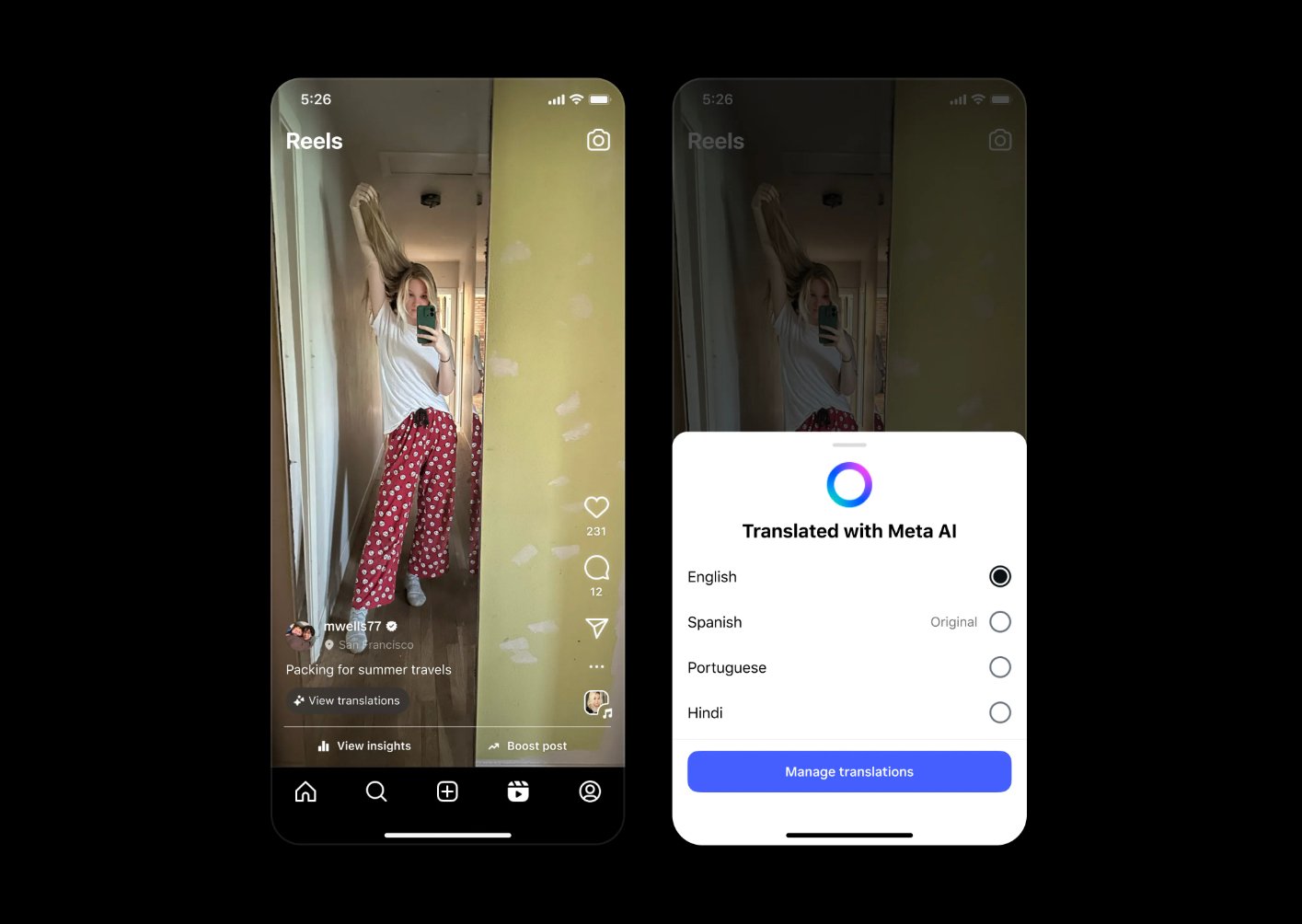
When you enable the feature, Meta AI listens to the speech in your Reel and creates a translated audio track. It aims to keep the tone and character of your own voice rather than replacing it with a generic voiceover. There’s also an optional lip-sync setting that adjusts mouth movements to better match the new audio.
Viewers who speak the target language can hear your Reel in their language, with a note that it was translated with Meta AI. They can usually choose to hear the original audio instead.
Which languages are supported?
The feature launched with English and Spanish, then added Hindi and Portuguese. In January 2026 Meta expanded it to five more Indian languages:
- Bengali
- Tamil
- Telugu
- Marathi
- Kannada
This makes the feature especially useful for creators in India, where audiences are spread across many languages. Meta has said more languages will follow, so check the translation settings in the app for the current list.
How to translate your Reels
- Record or upload your Reel and go to the final screen before sharing.
- Look for the option to Translate voices with Meta AI. If you don’t see it, check under More options.
- Open the translation settings to choose the target languages and decide whether to turn on lip sync.
- Turn on the option to review translations before they go live if it’s available. This lets you listen first.
- Publish the Reel. You can later remove or turn off translations from the Reel’s settings.
The feature may not be available on every account yet. Meta rolls features out gradually and may require a public creator or professional account.
How to get better translations
- Record clean audio. Background music, traffic or echo makes speech harder to recognise. Add music quietly, or add it after recording.
- Speak clearly and at a steady pace. Rushed speech and mumbled words are more likely to be mistranslated.
- Keep sentences short. Simple sentences translate more accurately than long ones with lots of clauses.
- Face the camera. Lip sync works best when your face is clearly visible and well lit.
- Avoid heavy slang and wordplay. Jokes and local phrases often don’t translate well. If they’re central to the video, check the translation carefully.
- Stick to one speaker. Reels with several people talking over each other are harder to translate.
Don’t forget on-screen text and captions
Translating the audio doesn’t automatically translate text you’ve typed onto the video. If your Reel relies on on-screen text, keep it short or use visuals that make sense without words. Meta has said it’s working on automatic translation for captions and stickers, but until that reaches your account, plan your text with a multilingual audience in mind.
Who should use Reel translations?
- Educators and explainer creators: tutorials and tips travel well across languages.
- Regional creators: a Marathi or Telugu creator can reach Hindi or English-speaking viewers without re-recording.
- Small businesses: product demos and how-to videos can reach customers in other states or countries.
- Travel and food creators: visual content with simple narration usually translates well.
How to measure whether it’s working
Compare Reels you translated with similar Reels you didn’t. Look at total views, the share of views from non-followers, and which countries or regions viewers come from in your insights. If translated Reels reach noticeably more new viewers, make translation part of your normal publishing routine.
FAQs
Is the feature free?
Yes. Meta offers AI translations for Reels at no cost to eligible creators.
Will my original audio still be available?
Yes. The translation is added as an extra version. Viewers can usually switch back to the original audio.
Can I remove a translation after publishing?
Yes. You can review, turn off or remove translations from the Reel’s settings at any time.
Summary
Meta AI translations make it possible to reach viewers who don’t speak your language, using your own voice. With support for Bengali, Tamil, Telugu, Marathi and Kannada added in 2026, it’s a practical tool for creators and businesses across India. Record clean audio, speak simply, review the result, and track whether translated Reels bring in new viewers.