Key takeaways
- Instagram stickers fall into four groups: interactive, expressive, utility and support stickers.
- Interactive stickers (polls, quizzes, questions, Add Yours) are the most useful for engagement because they ask viewers to do something.
- Use one main sticker per Story frame so the call to action is clear.
- Sticker responses show up in your Story viewer list, which makes them a free research tool.
Stickers are one of the easiest ways to make an Instagram Story or Reel feel personal. They take seconds to add, they don’t need any design skills, and the right one can turn a passive viewer into someone who taps, votes or replies. The problem is that the sticker tray has grown so large that most people only ever use the same two or three.
This guide walks through every main sticker type, explains when each one is worth using, and shares practical tips for creators and small businesses who want more replies, more profile visits and more useful feedback from their audience.
Table of Contents
ToggleWhere to find Instagram stickers
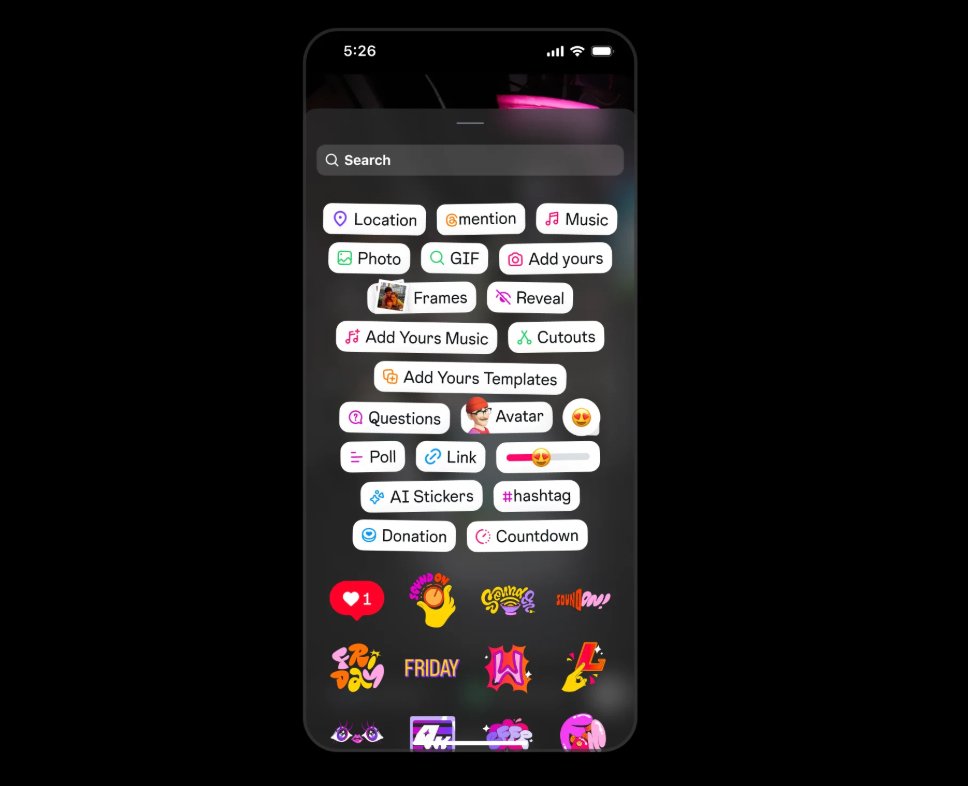
Open the Story camera, take or upload a photo or video, then tap the square smiley-face icon at the top of the screen. You can also swipe up on the editing screen. The tray opens with a search bar at the top, followed by the most popular stickers and then GIFs, music and seasonal collections. If you can’t see a sticker mentioned below, update the app first. Instagram tests and rolls out stickers gradually, so availability can differ by country and account.
Stickers are also available when editing Reels (tap the sticker icon in the Reels editor) and in direct messages, where they work more like reactions.
1. Interactive stickers
Interactive stickers invite viewers to respond. These matter most for growth, because every tap is a signal that people care about your content, and the replies give you ideas for what to post next.
- Poll: Ask a question with two or more options. Use it for quick opinions (“Which thumbnail is better?”) or to let followers choose your next post.
- Quiz: A multiple-choice question with one correct answer. Good for teaching a quick fact in your niche and testing what your audience already knows.
- Questions: Opens a text box so followers can send you a question or comment. Share the best answers in later Stories to build a simple Q&A series.
- Emoji slider: Viewers drag a slider to show how much they agree or like something. It needs almost no effort to answer, so response rates are usually high.
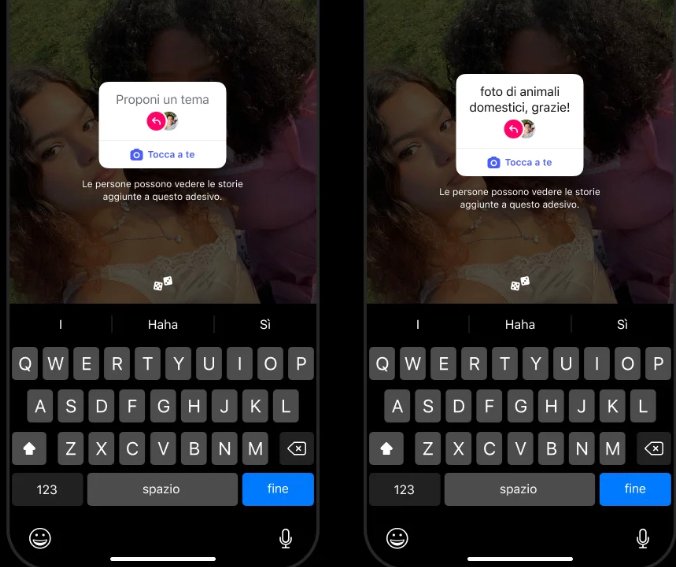
- Add Yours: Starts a chain where others post their own Story using your prompt. It can spread your idea beyond your followers when it catches on.
Tip: Ask questions your audience can answer in under three seconds. “Yes or no” and “this or that” polls get far more responses than open questions that need typing.
2. Expressive stickers
Expressive stickers add personality. They don’t ask for a response, but they make your content feel less polished and more human, which suits the casual feel of Stories.
- GIFs: Search the GIF library for animated reactions, arrows, underlines and text effects. Small animated arrows are useful for pointing at a link or product.
- Music: Adds a song clip with optional on-screen lyrics. Pick tracks that match the mood of the post rather than whatever is trending if it doesn’t fit your brand.
- Avatar stickers: If you’ve built an Instagram avatar, you can use it in different poses and reactions without showing your face on camera.
- Emoji and selfie stickers: Turn a quick selfie or emoji into a sticker to react to something you are sharing.
3. Utility stickers
Utility stickers add useful information to a Story. They’re especially handy for local businesses, events and launches.
- Location: Tags a place so your Story can be found by people browsing that location. Shops, cafés and clinics should use it on every Story taken at their premises.
- Mention: Tags another account, which notifies them and makes it easy for them to reshare your Story.
- Hashtag: Adds a tappable hashtag. Use one relevant tag rather than several.
- Countdown: Counts down to a launch, live session or sale. Viewers can tap to get a reminder when it ends, which is useful for driving attendance.
- Link: Sends viewers to a web page. Add a short reason to tap, such as “Full guide here” or “Get the free template”.
- Time, date and weather: Simple context stickers, useful for travel and day-in-the-life content.
4. Support stickers
Support stickers help you back causes and businesses. Depending on your region, you may see options to share a fundraiser, promote a small business or tag products from an Instagram Shop. For brands, product stickers turn a Story into a shoppable post with very little extra work.
How to choose the right sticker for each goal
| Your goal | Best sticker | Why it works |
|---|---|---|
| More engagement | Poll or emoji slider | One tap to answer, so lots of people respond |
| Content ideas | Questions | Followers tell you what they want to know |
| Website clicks | Link | Sends people straight to a page |
| Event attendance | Countdown | Viewers can set a reminder |
| Local discovery | Location | Story appears for people browsing that place |
| Reach beyond followers | Add Yours or Mention | Others reshare or join in |
Common sticker mistakes to avoid
- Too many stickers on one frame. A poll, a GIF, a link and a hashtag on the same screen compete with each other. Choose one action per frame.
- Covering faces or text. Place stickers in empty space, away from the top and bottom edges where profile info and the reply bar sit.
- Asking and never replying. If you use a Questions sticker, share answers. Otherwise people stop responding.
- Vague link text. “Link” tells people nothing. Say what they get when they tap.
Using sticker results to plan content
Every response to a poll, quiz or question appears in your Story viewer list. Check it before the Story expires and note which topics got the most answers. If a poll about editing apps gets twice the votes of one about posting times, that’s a clear sign of what your next Reel or post should cover. Over a few weeks, these small signals add up to a reliable content plan based on what your audience actually wants.
FAQs
Why can’t I see some Instagram stickers?
Instagram releases stickers gradually and some depend on your country, account type or app version. Update the app, then check again. Some stickers may only be available on business or creator accounts.
Can I add stickers to Reels?
Yes. Open the Reels editor and tap the sticker icon. Interactive stickers such as polls and quizzes are available on Reels as well as Stories.
Do stickers help reach?
Instagram doesn’t publish exact ranking factors, but stickers that get replies and taps create interaction, and interaction is one of the signals Instagram says it uses when deciding what to show people.
Summary
Stickers are a quick way to make your Stories and Reels more engaging. Use interactive stickers when you want responses, utility stickers when you want people to act or find you, and expressive stickers to add personality. Keep it to one clear sticker per frame, reply to the people who respond, and use the results to decide what to post next.